
The new drive towards digitalising our inspections program enables RightShip to offer two new inspection types that facilitate different approaches to minimise the time inspectors spend on board your vessel: hybrid and dual inspections.
1) The hybrid inspection
Using the Document Management Centre (DMC) for Hybrid Inspections
A Customer Guide
Hybrid Inspections combine remote document review with an onboard physical inspection. To ensure the inspection runs smoothly and avoids delays, customers must upload the required documents at least 72 hours in advance.
Use the Document Management Center (DMC) if you are proactively uploading documents before a Hybrid Inspection is booked.
This guide explains how the process works across four stages.
Chapter 1: Document Upload Before Inspection Booking
Why Upload Documents Before Booking?
Preparing documents early through the DMC helps reduce workload during the inspection window and ensures a smoother inspection experience. The majority of documents required for inspections can be uploaded in advance and reused across future inspections as long as they remain valid under Class or regulatory requirements.
Uploading documents early means:
- They are automatically stored in DMC
- They will appear instantly on the Hybrid Documents page when an inspection is booked
- You support your crew with less administrative work
How to Upload Documents Before Booking
There are two ways to upload documents proactively:
Documents uploaded in advance help the RightShip inspector complete the remote review efficiently, improving overall inspection efficiency and helping avoid delays.
A. Upload via the RISQ Requirements Page (Recommended)
- Navigate to RightShip Inspections – RISQ Requirements Page.
- Upload any relevant mandatory or optional documents.
This is the recommended method when there is no active inspection.
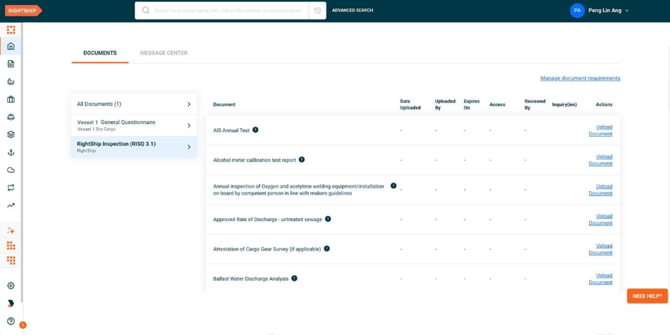
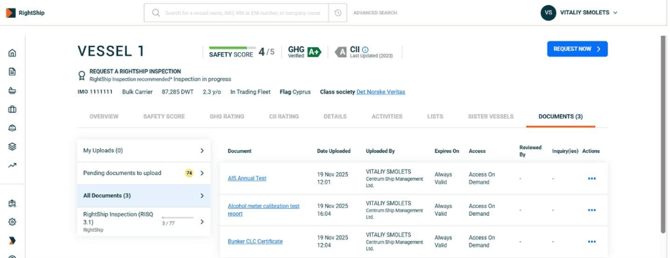
B. Upload from the Vessel Page (Alternative Method)
You can also proactively upload documents via Vessel → Documents.
All documents uploaded here also appear in DMC and will later be imported into the Hybrid Documents page.
Chapter 2: Booking a Hybrid Inspection
Document Upload During Inspection Booking
When booking a Hybrid Inspection, you must select the users who will upload documents for the inspection.
You will be prompted to enter the email addresses of all users who should have upload access.
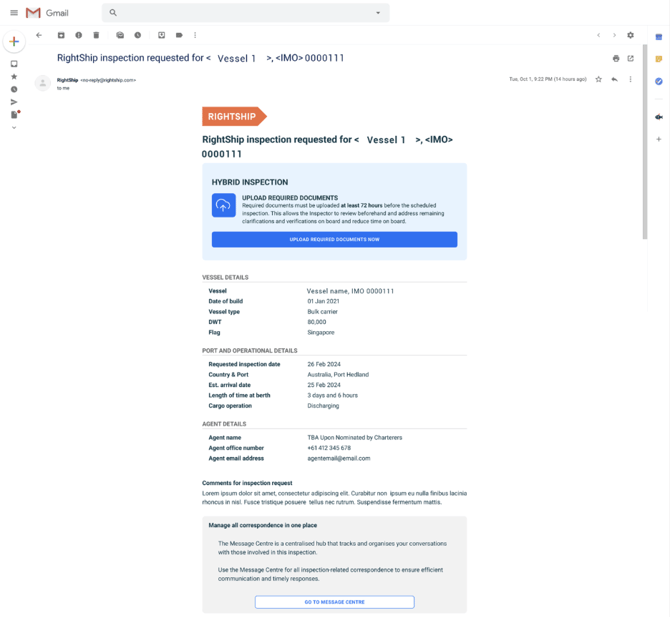
- These users receive a Hybrid Upload Invitation Email
- The email includes a direct link to the Hybrid Documents page
Post-Booking Email Notification
Once your booking is confirmed:
- All nominated users receive an Upload Documents email
- This contains the link and instructions for completing the remaining uploads
If someone was missed:
They can still be added later from the Hybrid Documents page.
Access Permissions & Registration
To upload documents, users must:
- Be registered on the RightShip platform
- Have upload permission for the relevant inspection
If a user is not registered:
- They will need to create a free account via RightStore
If a user does not yet have upload access:
- Their Hybrid Documents page will show a restricted view
- They can click Request Access
- The request is sent to the vessel’s Technical Manager, who can approve or deny access
Chapter 3: Hybrid Documents Page (Post-Booking)
Once your Hybrid Inspection is booked, all relevant document upload activity moves to the Hybrid Documents page.
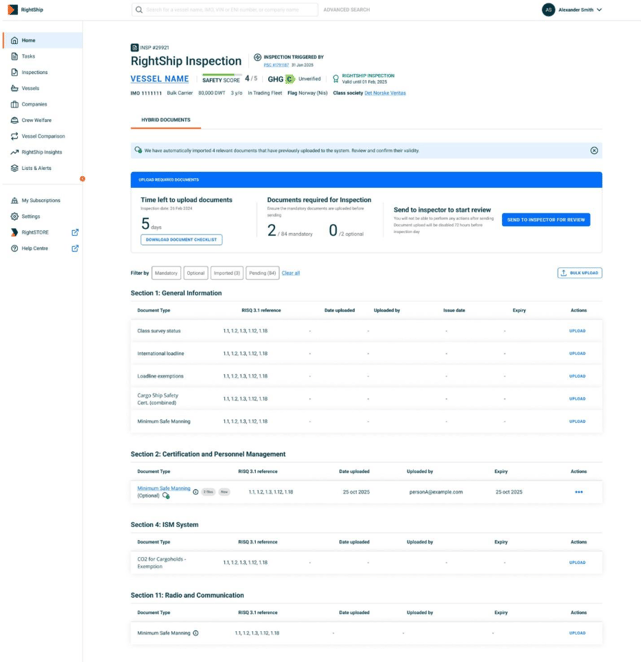
See All Imported Documents from DMC
When you open the Hybrid Documents page, you will see:
- All documents previously uploaded to DMC
- Tags showing which documents were Imported from DMC
This ensures nothing needs to be re-uploaded if it was already provided earlier.
Upload Remaining Documents
Use the Hybrid Documents page to upload any additional items. You may upload additional documents using:
A. Single Upload
Upload one document at a time—useful for smaller updates.
B. Bulk Upload
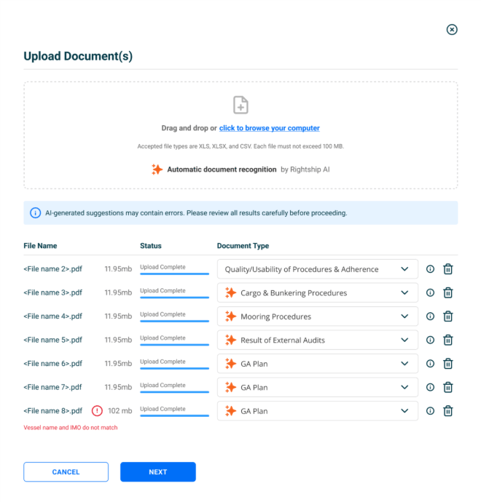
Upload multiple files at once. RightShip AI will:
- Read filenames
- Propose the correct document type mapping
You must confirm or correct the mapping before submission.
Returning to the Hybrid Documents Page
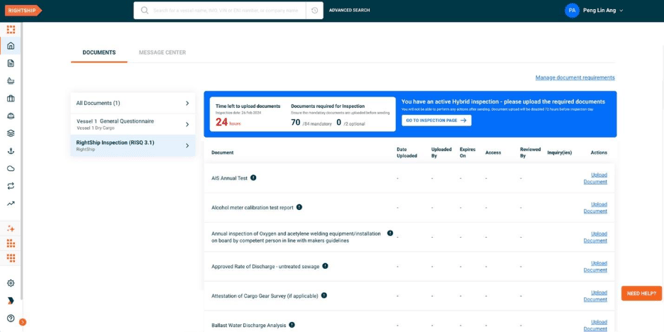
You can return any time before the deadline using:
- The inspection booking confirmation email
- The RightFleet Home page (task card prompting upload)
- A banner on the DMC or Vessel Documents page directing you to the Hybrid upload page
Chapter 4: Document Upload Timeline & Inspector Review
72-Hour Upload Cutoff
All required documents must be uploaded at least 72 hours before the inspection.
The Hybrid Documents page displays:
- A countdown timer
- The exact deadline
- A reminder that uploads close after that point

Automated Reminder Emails
RightShip also sends reminders:
- 72 hours before the upload deadline
- 48 hours before
- 24 hours before
These reminders help ensure all documents are submitted on time to avoid inspection delays.
Automatic Sending to Inspector
Once the upload window closes:
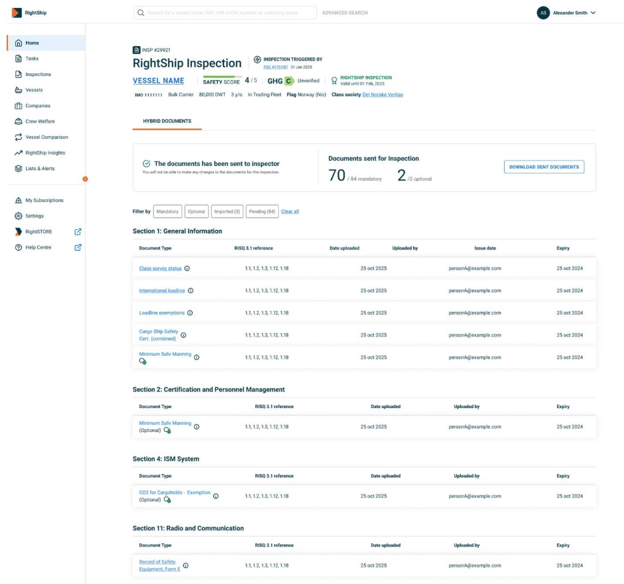
- All documents are automatically sent to the inspector
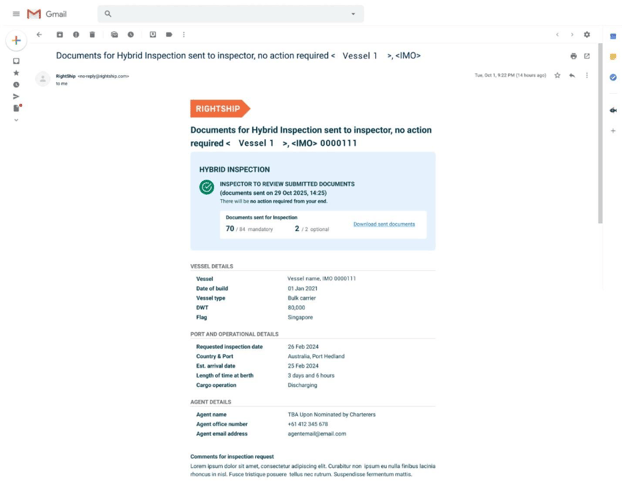
- Users receive:
- A confirmation email
- A downloadable list of all documents sent
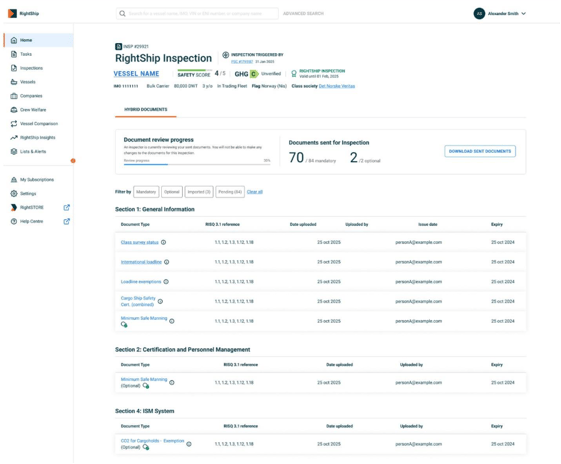
- The Hybrid Documents page updates to show Documents sent to inspector
Inspector Review Progress
After submission, the Hybrid Documents page displays an Inspector Review Progress Bar (e.g., “50% reviewed”).
This helps you understand inspector preparation.
On Inspection Day
Once the inspector’s review period ends on the day of inspection:
- The Hybrid Documents page updates to show the final review status
- No further document review takes place inside the system
Need to Know Which Documents to Prepare?
Click here to see the list of required documents for Dry Bulk Hybrid Inspections under RISQ 3.2.
2) Dual Inspections
Having a dual inspection is another way inspections could be done in ports with shorter port stay. The dual inspection is similar to the standard one only being performed by two inspectors that will split the questionnaire between themselves and execute different sections,
The Benefit
The RightShip dry bulk dual inspection reduces the overall time inspection would take by engaging two inspectors. This enables RightShip to perform a vessel inspection despite having a shorter port stay
How do I request a dual inspection?
Currently there is no request option for a dual inspection. If during the review of your request for inspection RightShip Inspections Team believes there is not enough port stay time to perform a standard inspection the team may investigate if the 2-inspector option is suitable. During this investigation different parameters are considered, such as:
- The duration of the port stay
- The port location
- Availability of additional RightShip inspector in the area
- Additional travel cost implications,
- If, after the investigation, the RightShip Inspection Team believes that the dual inspection is a suitable approach they will contact you to confirm the details.