
PSC Risk IQ includes automation features that reduce the manual work required to prepare vessels for Port State Control (PSC) inspections.
Admin users can configure notification email settings so:
- PSC preparation checklists will automatically be sent to crews
- Weekly summaries of upcoming voyages and risks will be sent to admin users
These settings are located in:
Vessel preparation settings → Automated emails
The configuration applies at the customer level, meaning the most recent change made by an admin user applies to all admins within the account.
Automated Checklist Emails
The Automated checklist feature allows PSC Risk IQ to automatically send preparation checklists when voyages match selected PSC Inspection Risk levels.
When enabled, PSC Risk IQ will:
- Evaluate the PSC Inspection Risk of each voyage
- Send the preparation checklist to the vessel email
- Copy the technical superintendent
Emails are sent immediately when a voyage is generated, and the PSC Inspection Risk is calculated.
Voyages may be created:
- Automatically through AIS data
- Manually by users
If a destination port is edited by AIS and the new port results in a risk level that matches the configured settings, PSC RiskIQ will resend the checklist.
Risk level options
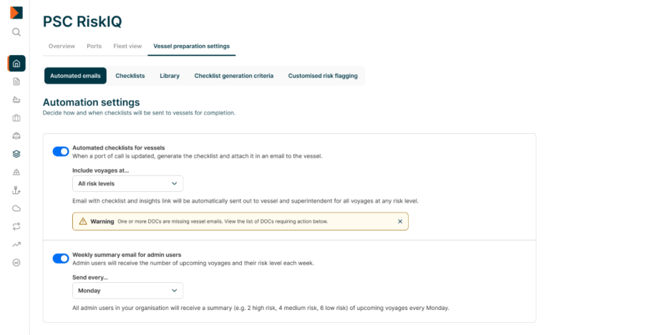
Admins can choose which risk levels trigger checklist emails:
- High PSC Inspection Risk
- Medium PSC Inspection Risk
- Low PSC Inspection Risk
Multiple levels can be selected.
Default setting
- Enabled
- Triggered for High and Medium PSC Inspection Risk
Important
Checklist emails are sent to:
- The vessel email
- The technical superintendent (CC)
If a vessel does not have a vessel or a technical superintendent email configured, PSC RiskIQ will display a warning message in the admin settings page, and no checklist email will be sent.
Weekly Summary Email
The Weekly summary email provides admin users with a breakdown of upcoming voyages in PSC RiskIQ by Inspection Risk. An Excel file is attached to the email, with a more detailed view of each upcoming voyage, and their risk details.
The email is sent to all PSC RiskIQ administrators within the customer account.
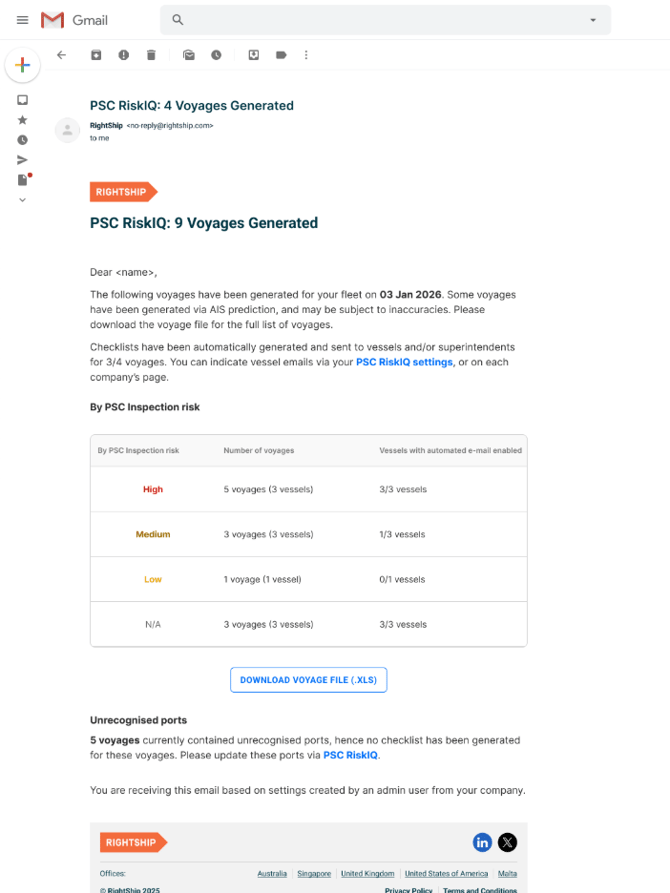
Admins can select:
- The day of the week the summary is sent
Default setting
- Enabled
- Sent every Monday
How to Configure Automated Emails (4 Steps)
- Go to Vessel preparation settings in PSC RiskIQ
- Open the Automated emails tab
- Enable Automated checklist emails and select the PSC Inspection Risk levels that should trigger checklist distribution
- Configure the Weekly summary email by selecting the day of the week
Once configured, PSC RiskIQ will automatically send checklist emails and weekly summaries based on these settings.
How Crews Receive and Download PSC RiskIQ Checklists
PSC RiskIQ can automatically send PSC preparation checklists directly to vessel crews when a voyage meets the risk criteria configured by the admin user. This is an optional feature; if users do not wish this to happen, they can leave the vessel email address blank on the settings page.
This helps ensure vessels are prepared for upcoming port calls without requiring the technical superintendent to distribute manual checklists.
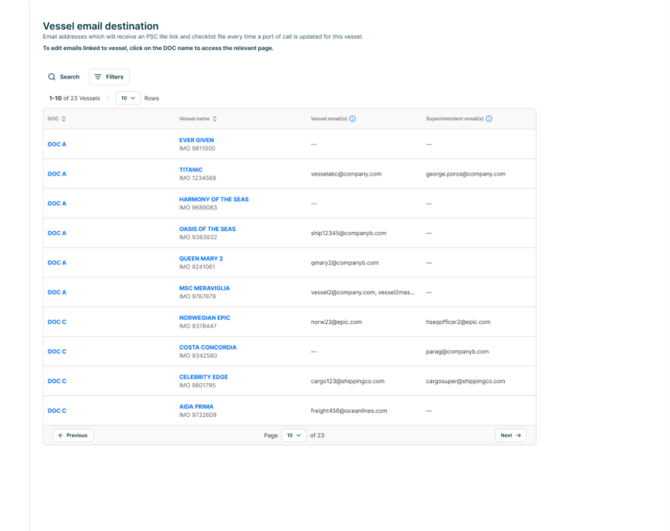
When crews receive a checklist
A checklist email is sent when:
- A voyage is generated in PSC RiskIQ through AIS.
- The voyage matches the PSC Inspection Risk levels selected in the Automated Checklist settings.
If a destination port is edited by AIS and the new port changes the PSC Inspection Risk to a level that matches the configured settings, PSC RiskIQ will resend the checklist.
Who receives the checklist
The email is sent to:
- The vessel email address
- The technical superintendent (CC)
The vessel email address is associated with the vessel IMO configured in PSC RiskIQ.
If a vessel does not have a vessel email configured, the checklist email will only be sent to the superintendent. If no email addresses are configured on a vessel, checklist emails won't be sent to that vessel.
How crews download the checklist
When the email is received, the crew can:
- Open the PSC RiskIQ checklist email
- Click the checklist link included in the message, to download the checklist
The checklist is tailored to the upcoming voyage and helps crews prepare for a potential PSC inspection at the next port call.
Purpose of the checklist
The checklist is designed to help crews:
- Prepare for upcoming PSC inspections
- Review key inspection areas before arrival
- Reduce the likelihood of PSC deficiencies or detentions
How PSC RiskIQ Determines PSC Inspection Risk
PSC RiskIQ evaluates voyages and identifies which port calls present a higher likelihood of PSC inspection with deficiencies.
This allows technical superintendents and crews to focus preparation efforts where they are most needed.
Voyage creation
Voyages can be created in PSC RiskIQ in two ways:
- Automatically, using AIS data to detect the vessel’s next likely port call and ETA
- Manually, by users creating voyages within PSC RiskIQ
Once a voyage is created, PSC RiskIQ evaluates it to determine the PSC Inspection Risk level.
PSC Inspection Risk levels
Each voyage is classified into one of the following risk categories:
- High PSC Inspection Risk
- Medium PSC Inspection Risk
- Low PSC Inspection Risk
These classifications are used to determine whether automated checklist emails on voyages generated from AIS should be sent based on the settings configured by the admin user.
How the risk classification is used
PSC Inspection Risk levels support several PSC RiskIQ workflows:
- Automated checklist distribution to vessel crews
- Notifications to technical superintendents
- Overview of upcoming voyages by PSC Inspection risk in weekly summary emails
This ensures preparation efforts are focused on voyages where the likelihood of PSC deficiencies is higher.
Keeping voyage information accurate
If the destination port is updated on AIS, PSC RiskIQ will recalculate the PSC Inspection Risk for the voyage.
If the new risk level matches the configured automation settings, PSC RiskIQ will send a new checklist email to the vessel.